sudo apt update
sudo apt install mysql-server
sudo mysql_secure_installation
sudo apt update sudo apt install mysql-server sudo mysql_secure_installation
sudo mysql_secure_installation
root@localhost:/etc/apache2# sudo mysql_secure_installation

Securing the MySQL server deployment.

Connecting to MySQL using a blank password.

VALIDATE PASSWORD PLUGIN can be used to test passwords
and improve security. It checks the strength of password
and allows the users to set only those passwords which are
secure enough. Would you like to setup VALIDATE PASSWORD plugin?

Press y|Y for Yes, any other key for No: y

There are three levels of password validation policy:

LOW    Length >= 8
MEDIUM Length >= 8, numeric, mixed case, and special characters
STRONG Length >= 8, numeric, mixed case, special characters and dictionary                  file

Please enter 0 = LOW, 1 = MEDIUM and 2 = STRONG: 0
Please set the password for root here.

New password:

Re-enter new password:

Estimated strength of the password: 50
Do you wish to continue with the password provided?(Press y|Y for Yes, any other key for No) : y
By default, a MySQL installation has an anonymous user,
allowing anyone to log into MySQL without having to have
a user account created for them. This is intended only for
testing, and to make the installation go a bit smoother.
You should remove them before moving into a production
environment.

Remove anonymous users? (Press y|Y for Yes, any other key for No) : y
Success.


Normally, root should only be allowed to connect from
'localhost'. This ensures that someone cannot guess at
the root password from the network.

Disallow root login remotely? (Press y|Y for Yes, any other key for No) : n

 ... skipping.
By default, MySQL comes with a database named 'test' that
anyone can access. This is also intended only for testing,
and should be removed before moving into a production
environment.


Remove test database and access to it? (Press y|Y for Yes, any other key for No) : y
 - Dropping test database...
Success.

 - Removing privileges on test database...
Success.

Reloading the privilege tables will ensure that all changes
made so far will take effect immediately.

Reload privilege tables now? (Press y|Y for Yes, any other key for No) : n

 ... skipping.
All done!
Check authentication method for MySQL users
|
1 2 3 4 5 6 7 8 9 10 11 12 13 14 15 16 17 18 19 20 21 22 23 24 25 26 27 28 29 30 31 32 33 34 35 36 37 38 39 40 41 42 43 44 45 46 47 48 |
root@localhost:/etc/apache2# sudo mysql -uroot -p Enter password: Welcome to the MySQL monitor. Commands end with ; or \g. Your MySQL connection id is 4 Server version: 5.7.30-0ubuntu0.18.04.1 (Ubuntu) Copyright (c) 2000, 2020, Oracle and/or its affiliates. All rights reserved. Oracle is a registered trademark of Oracle Corporation and/or its affiliates. Other names may be trademarks of their respective owners. Type 'help;' or '\h' for help. Type '\c' to clear the current input statement. mysql> use mysql Reading table information for completion of table and column names You can turn off this feature to get a quicker startup with -A Database changed mysql> SELECT user,host,authentication_string,plugin,host FROM mysql.user; +------------------+-----------+-------------------------------------------+-----------------------+-----------+ | user | host | authentication_string | plugin | host | +------------------+-----------+-------------------------------------------+-----------------------+-----------+ | root | localhost | | auth_socket | localhost | | mysql.session | localhost | *THISISNOTAVALIDPASSWORDTHATCANBEUSEDHERE | mysql_native_password | localhost | | mysql.sys | localhost | *THISISNOTAVALIDPASSWORDTHATCANBEUSEDHERE | mysql_native_password | localhost | | debian-sys-maint | localhost | *C93D3360F51BE0E6E42E58C4D7F4853973596949 | mysql_native_password | localhost | +------------------+-----------+-------------------------------------------+-----------------------+-----------+ 4 rows in set (0.00 sec) mysql> ALTER USER 'root'@'localhost' IDENTIFIED WITH mysql_native_password BY 'StrongPassword'; Query OK, 0 rows affected (0.00 sec) mysql> SELECT user,authentication_string,plugin,host FROM mysql.user; +------------------+-------------------------------------------+-----------------------+-----------+ | user | authentication_string | plugin | host | +------------------+-------------------------------------------+-----------------------+-----------+ | root | *E57EB53ADCB799E5C107333FBBF5429597A509AC | mysql_native_password | localhost | | mysql.session | *THISISNOTAVALIDPASSWORDTHATCANBEUSEDHERE | mysql_native_password | localhost | | mysql.sys | *THISISNOTAVALIDPASSWORDTHATCANBEUSEDHERE | mysql_native_password | localhost | | debian-sys-maint | *C93D3360F51BE0E6E42E58C4D7F4853973596949 | mysql_native_password | localhost | +------------------+-------------------------------------------+-----------------------+-----------+ 4 rows in set (0.00 sec) mysql> FLUSH PRIVILEGES; Query OK, 0 rows affected (0.00 sec) |
host 가 % 일경우
|
1 2 3 4 5 |
:: host가 % 일 경우 mysql> ALTER USER 'root'@'%' IDENTIFIED WITH mysql_native_password BY 'StrongPassword'; Query OK, 0 rows affected (0.00 sec) |
#주석처리 #bind-address=127.0.0.0
vi /etc/mysql/mysql.conf.d/mysqld.cnf
|
1 2 3 4 |
bind-address = 0.0.0.0 mysqlx-bind-address = 0.0.0.0 |
|
1 2 3 |
sudo systemctl restart mysql |
ufw allow 연결 설정 Or IPtable Port open
ufw allow from myIP(111.222.333.222) to any port 3306
iptables -A INPUT -p tcp -s myIP(111.222.333.222) --dport 3306 -j ACCEPT
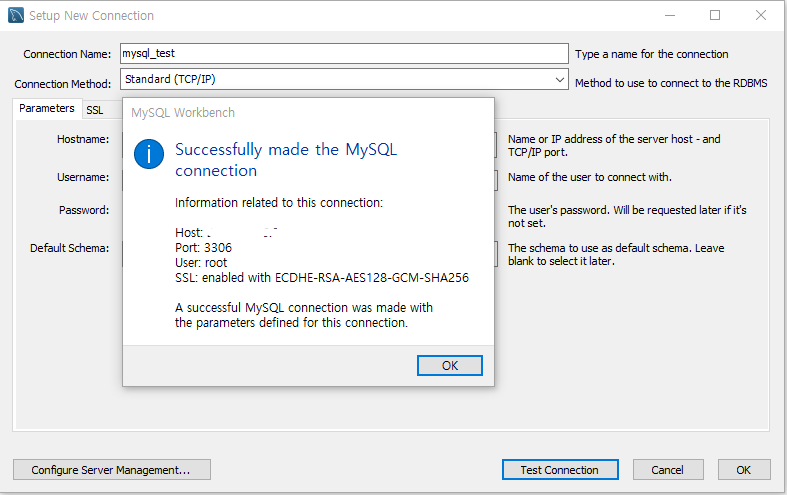
Mysql WorkBench