
1️⃣ IIS (Windows / web.config 기반)
✔️ 기본 개념
- 모듈: URL Rewrite Module 필요
- 설정 위치:
web.config - XML 기반
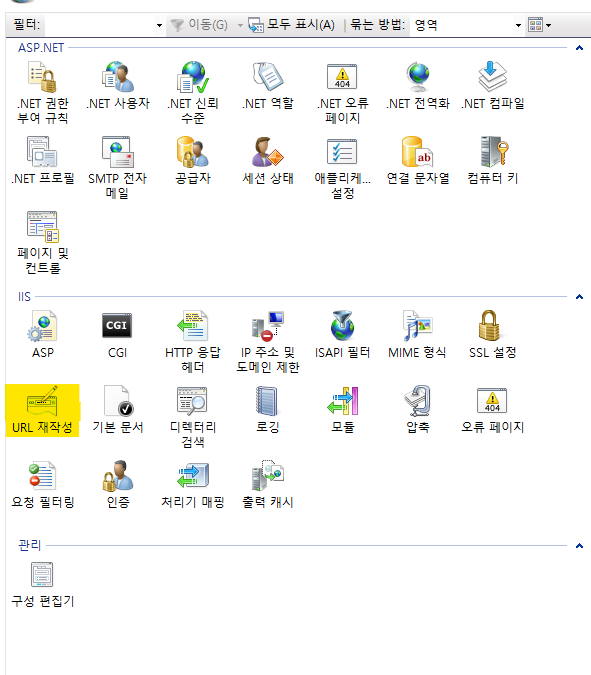
👉 Rewrite 모듈 없으면 오류 발생 (이미 겪으신 그 케이스)
✔️ 설치 (없을 경우)
방법 1 — 공식 다운로드 설치 (가장 안전)

Microsoft IIS URL Rewrite Module 2.1을 설치하면 됩니다.

설치 순서

아래 공식 페이지 접속
https://www.iis.net/downloads/microsoft/url-rewrite

Install this extension 클릭
✔️ 기본 예제 (ASPX Rewrite)
|
1 2 3 4 5 6 7 8 9 10 11 12 13 14 15 16 17 18 19 20 |
<configuration> <system.webServer> <rewrite> <rules> <!-- /EView → NewET.aspx --> <rule name="EView rewrite" stopProcessing="true"> <match url="^EView(\.aspx)?$" /> <action type="Rewrite" url="NewET.aspx" /> </rule> <!-- /TView → NewIT.aspx --> <rule name="TView rewrite" stopProcessing="true"> <match url="^TView(\.aspx)?$" /> <action type="Rewrite" url="NewIT.aspx" /> </rule> </rules> </rewrite> </system.webServer> </configuration> |
✔️ 주요 옵션 설명
| 항목 | 설명 |
|---|---|
<match url=""> | 요청 URL 패턴 (정규식) |
<action type="Rewrite"> | 내부 경로 변경 |
Redirect | 브라우저 URL 변경 |
stopProcessing | 이후 rule 실행 중지 |
✔️ Redirect 예제 (SEO용)
|
1 2 3 |
<action type="Redirect" url="https://example.com/new" redirectType="Permanent" /> |
2️⃣ Apache (Linux / .htaccess 또는 httpd.conf)
✔️ 기본 개념
- 모듈:
mod_rewrite - 설정 위치:
✔️ 모듈 활성화 (Ubuntu 기준)
a2enmod rewrite
systemctl restart apache2
✔️ 기본 예제 (.htaccess)
|
1 2 3 4 5 |
RewriteEngine On# /EView → NewET.php RewriteRule ^EView/?$ NewET.php [L]# /TView → NewIT.php RewriteRule ^TView/?$ NewIT.php [L] |
✔️ Redirect 예제
|
1 2 3 |
RewriteRule ^old$ https://example.com/new [R=301,L] |
✔️ QueryString 유지
|
1 2 3 |
RewriteRule ^ticket$ NewET.php [L,QSA] |
✔️ 조건 (if 개념)
|
1 2 3 4 |
RewriteCond %{REQUEST_METHOD} POST RewriteRule ^api$ api.php [L] |
3️⃣ IIS vs Apache 비교
| 항목 | IIS | Apache |
|---|---|---|
| 설정 파일 | web.config | .htaccess / conf |
| 문법 | XML | 텍스트 |
| 모듈 | URL Rewrite 설치 필요 | mod_rewrite 기본 포함 |
| 정규식 | .NET regex | Apache regex |
| UI | IIS Manager GUI 있음 | CLI 중심 |
4️⃣ 실무 핵심 포인트 (중요)
✔️ IIS에서 자주 나는 오류
- ❌
<rewrite>있는데 모듈 없음 → 500 오류 - ❌
<system.web>아래 넣음 → 오류
👉 반드시<system.webServer>아래
✔️ Apache에서 자주 문제
- ❌
.htaccess무시됨
👉AllowOverride All필요
|
1 2 3 4 5 |
<Directory /var/www/html> AllowOverride All </Directory> |
5️⃣ 동일 기능 변환 예 (실무 중요)
👉 IIS
|
1 2 3 4 |
<match url="^product/([0-9]+)$" /> <action type="Rewrite" url="product.aspx?id={R:1}" /> |
👉 Apache
|
1 2 3 |
RewriteRule ^product/([0-9]+)$ product.php?id=$1 [L] |
✔️ 결론
- IIS = web.config + XML + 모듈 필요
- Apache = .htaccess + 간단한 규칙